Projects / ZeroTrustEncryptor
ZeroTrustEncryptor
FreePortable AES-256-GCM file encryption for Windows. No installation, no accounts, no cloud.
ZeroTrustEncryptor is a portable file encryption tool that protects your files with AES-256-GCM encryption and Argon2id key derivation. Drag and drop files into the GUI, enter a password, and your files are encrypted into .zte format. Decrypt them the same way. It also obfuscates filenames, securely wipes originals, and runs entirely offline as a single .exe - no installation, no accounts, no data leaves your machine.
Why use ZeroTrustEncryptor
AES-256-GCM encryption
Military-grade authenticated encryption. Each file gets a unique nonce. Tamper detection is built in - if a single byte is altered, decryption fails.
Argon2id key derivation
Your password is stretched using Argon2id - the winner of the Password Hashing Competition. Resistant to GPU, ASIC, and side-channel attacks.
Filename obfuscation
Encrypted files are renamed to random UUIDs. An observer can't tell what was encrypted just by looking at the filenames.
Secure file wipe
After encryption, the original file is overwritten with random data before deletion. Simple deletion leaves recoverable data - this doesn't.
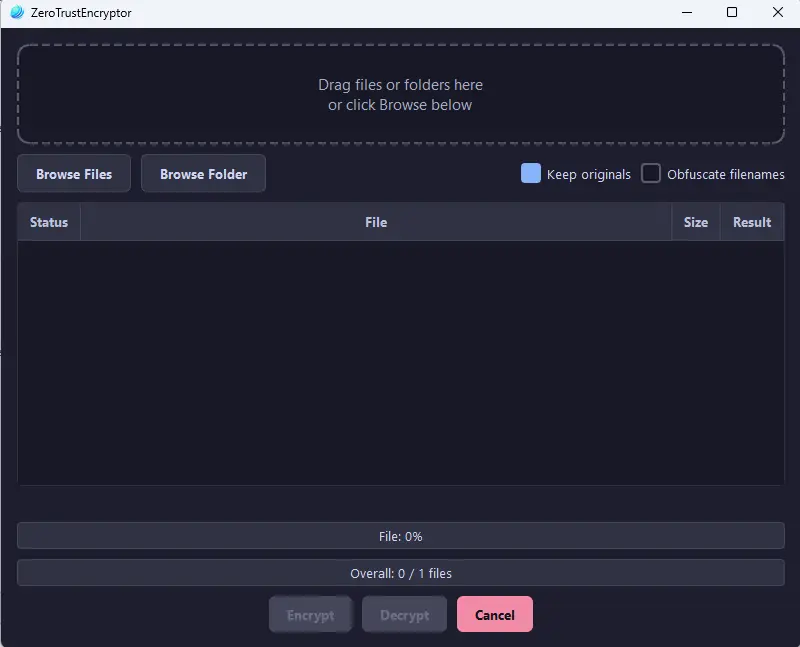
Drag-and-drop GUI
No command line needed. Drop files onto the window, enter your password, and click Encrypt or Decrypt.
Password strength check
Real-time password strength meter using zxcvbn. Warns you before encrypting with a weak password.
How it works
- 01
Download the executable
Download ZeroTrustEncryptor.exe. It's a single portable file - no installation, no dependencies.
- 02
Drop your files
Drag and drop one or more files onto the application window, or use the file browser to select them.
- 03
Enter your password
Choose a strong password. The strength meter gives instant feedback. Confirm it, then click Encrypt or Decrypt.
- 04
Done
Encrypted files are saved as .zte with obfuscated names. Originals are securely wiped. To decrypt, drop the .zte file back in and enter the same password.
What's under the hood
- AES-256-GCM: authenticated encryption with 256-bit keys and unique 12-byte nonces per file
- Argon2id KDF: memory-hard key derivation (64 MB, 3 iterations, 4 parallelism) with random 16-byte salt
- Secure wipe: original files overwritten with cryptographically random data before deletion
- .zte file format: salt + nonce + encrypted original filename + ciphertext + GCM auth tag
- Portable executable: single .exe packaged with PyInstaller, no Python or dependencies required
Privacy
ZeroTrustEncryptor runs entirely on your computer. No telemetry, no analytics, no cloud sync, no automatic updates - the .exe is the whole product. It does not connect to the internet, does not phone home, and does not transmit, log, or upload any of the files you encrypt. Your passphrase is processed in memory only and is never written to disk. KG3N Dynamics never has access to it, never sees the files you encrypt, and would have no way to recover either if you lose the passphrase.
Frequently asked questions
Is it free?
Yes, completely free. No sign-up, no licence key, no premium tier. Download and use it.
Is it safe to use?
ZeroTrustEncryptor uses AES-256-GCM (the same standard used by governments and financial institutions) with Argon2id key derivation. It runs entirely offline - no data is sent anywhere. The encryption is only as strong as your password, so use a strong one.
What is the .zte file format?
A .zte file contains the salt, nonce, encrypted original filename, ciphertext, and GCM authentication tag - everything needed to decrypt the file with the correct password. The format is specific to ZeroTrustEncryptor.
Do I need Python installed?
No. The download is a standalone .exe that includes everything it needs. Just run it directly - no Python, no pip, no setup.
Windows SmartScreen shows a warning?
SmartScreen may warn about the file because it's new and unsigned. This is normal for independent software. You can click "More info" then "Run anyway" to proceed. The tool is open-source if you want to inspect the code.
Can I use the command line instead?
Yes. ZeroTrustEncryptor supports full CLI mode. Run it with --help to see available commands. You can encrypt, decrypt, and configure options entirely from the terminal.