Free Tool

SVG PaySlip Generator

A bulk payroll document generator for SVG employers and HR teams. Upload a CSV of employee data, customise your company branding once, and export a professional PDF pay slip for every employee - all in your browser, with zero data leaving your computer.

Launch Tool Download (.html)

No sign-up required. Works online and offline once loaded.

Overview

What It Does

The PaySlip Generator turns a spreadsheet of payroll data into print-ready salary slips that match the format used by SVG employers. Instead of filling out each employee's pay slip by hand, upload a single CSV with all your employees for the month, customise the company branding once, and export a professional PDF for every person in your organisation.

Built for the Saint Vincent and the Grenadines business environment: EC$ currency by default, NIS and PAYE fields, and layouts that match the standard expectations of local employees and regulatory bodies.
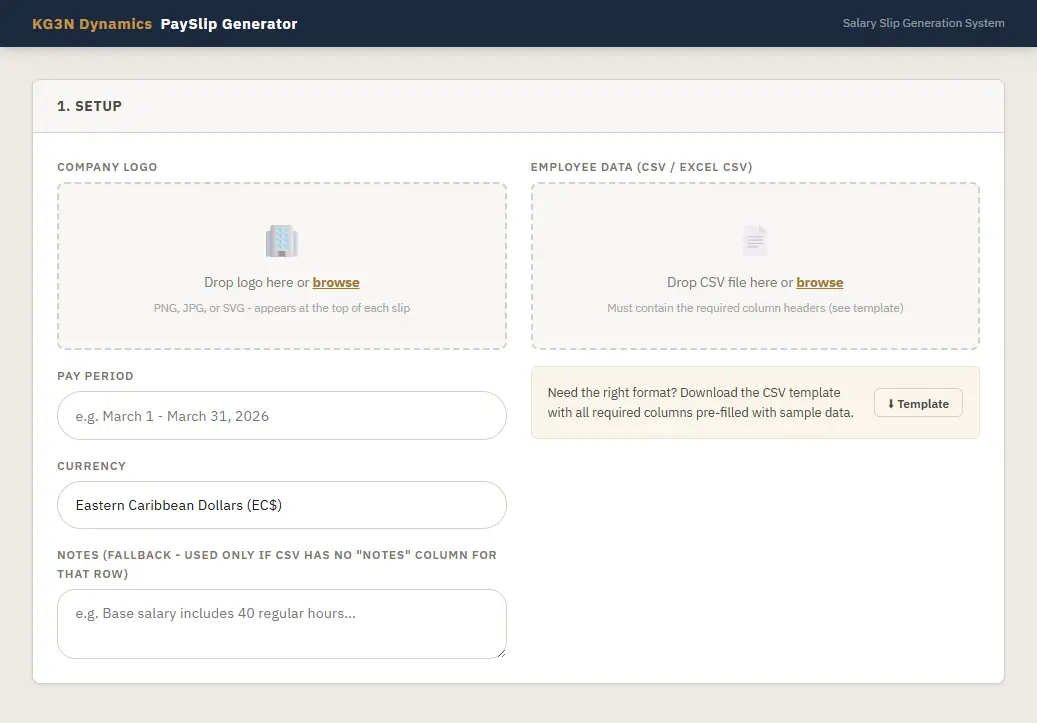
PaySlip Generator - bulk upload, per-employee preview, and PDF export
Capabilities

Key Features

Bulk CSV Processing

Bulk CSV Processing

Upload a spreadsheet with up to hundreds of employees at once. The tool validates your data, flags formatting errors, and loads every record in seconds.

Multiple Income Sources

Multiple Income Sources

Handle base salary plus bonus, overtime, and any other earnings. Each slip shows a clean breakdown: Base Salary, Bonus/Additional OT, and Total Gross Earnings.

Comprehensive Deductions

Comprehensive Deductions

Loans, Health Insurance, NIS (Employee), and PAYE Income Tax - all calculated and displayed on the slip with a Total Deductions line.

Post-Additions Support

Post-Additions Support

Allowances, reimbursements, or other non-taxable additions after deductions are handled cleanly - the net salary reflects them correctly.

Custom Company Logo

Custom Company Logo

Upload your company logo once and it appears at the top of every slip you generate. Supports PNG, JPG, and SVG.

Custom Pay Period

Custom Pay Period

Set the pay period once (e.g. "March 1 - March 31, 2026") and it applies to every slip in the batch.

Per-Employee Notes

Per-Employee Notes

Add a "Notes" column to your CSV for individual commentary - bonuses, overtime calculations, irregular pay periods. Or set a global fallback note for the whole batch.

Live Preview with Navigation

Live Preview with Navigation

Before exporting, flip through every generated slip in the browser with Previous/Next controls. See exactly how each one will look.

Individual PDF Export

Individual PDF Export

Export one slip as a named PDF (e.g. John_Doe_PaySlip.pdf), or export all at once - each as its own file for easy distribution to employees.

Getting Started

How It Works

Five steps from spreadsheet to printed slips.

1

Set Up Your Company

Upload your company logo, enter the pay period, and set the currency (defaults to Eastern Caribbean Dollars). Optionally add a fallback note that appears on every slip unless overridden per row.

2

Upload Your CSV

Drag and drop your employee CSV into the upload zone, or click to browse. The tool validates required columns and loads every record. If anything's missing, you get a specific error telling you which columns to add.

3

Review the Records

Once loaded, see all employees in a table with gross, PAYE, and net pay for each. The stats bar shows your totals. Click "Preview" on any row to see that specific slip.

4

Generate and Preview

Click "Generate All Slips" to build the printable layouts. Use the Previous/Next arrows to flip through every slip and verify the data.

5

Export

Use "Export This Slip" for a single PDF, or "Export All (Separate PDFs)" to download every slip as its own named file. PDFs are A4, print-ready, and named using each employee's name.

Data Format

Required CSV Columns

Values can include $ symbols, comma thousands separators, and quoted strings - the tool handles all common CSV money formats.

Employee Name - Full name (appears in bold on the slip)
Position - Job title
Base Salary (Monthly) - Base monthly pay
Bonus / Additional OT - Any overtime or bonus earnings
Total Gross Earnings - Base + Bonus
Loans / Other Deductions - Loan repayments or other deductions
Health Insurance Contribution - Employee's health insurance portion
NIS (Employee) - National Insurance Scheme contribution
PAYE (Income Tax) - PAYE tax deducted
Total Deductions - Sum of all deductions
Post Additions - Any non-taxable additions after deductions
Notes - Optional per-employee note that appears at the bottom of the slip

A pre-filled CSV template with these exact headers and three sample rows is available inside the tool.

Privacy

What This Tool Sends Home

Everything runs in your browser. There is no server upload, no account creation, and no data storage on our side. Your employee payroll information never leaves your computer.

When you upload a CSV, it is parsed by code running inside your browser. Generated PDFs are rendered in-browser and saved directly to your device via your browser's download system. Nothing is sent to KG3N Dynamics or any third party.

No analytics, no tracking pixels, no telemetry. Once loaded, the tool works fully offline - bookmark the page and it continues to function without a connection.

For data we collect when you visit kg3n.com itself (separate from this tool), see our site privacy policy.

FAQ

Frequently Asked Questions

Is this really free?

Yes, free for business use. No sign-up, no email required, no hidden fees.

Does it calculate PAYE or NIS for me?

No. The tool formats the numbers you enter into a professional slip layout - it does not calculate taxes or validate NIS rates. Use the SVG PAYE Tax Calculator alongside it if you need to compute PAYE first, and always verify against current Inland Revenue guidance before issuing slips.

Where does my employee data go?

Nowhere. The tool runs entirely in your browser. Your CSV is parsed locally, the PDFs are rendered locally, and nothing is transmitted to KG3N Dynamics or any other server.

Can I use it on a phone?

It works in mobile browsers, but a desktop or laptop is recommended for bulk operations. PDF export and file uploads are easier on a full keyboard.

Can I customise the slip layout?

You can upload your own company logo and set the pay period and currency. The slip layout itself is fixed to match the format used by SVG employers and regulatory bodies.

What browsers does it support?

Any modern browser - Chrome, Firefox, Safari, Edge. The core CSV parsing and calculation logic is compiled to WebAssembly, so performance is consistent across browsers.

Who is this for?

Small and medium-sized SVG businesses handling their own payroll without enterprise HR software, accountants preparing pay slips for multiple clients, HR teams issuing standardised salary documentation each pay period, and anyone who currently types up pay slips in Word or Excel by hand.

Is this an official government tool?

No. This is an independent tool built by KG3N Dynamics. It produces salary documentation based on the data you provide - it does not calculate taxes, validate NIS rates, or verify that your deductions are correct. Always verify your payroll calculations against current SVG Inland Revenue guidance and NIS contribution tables before issuing slips to employees.

Get Started

Stop Typing Pay Slips by Hand

Upload a CSV once a month. Export a PDF for every employee in seconds.

Launch Tool Download (.html)
Custom Work

Need It Tailored to Your Business?

The free version covers the standard SVG pay-slip format. If your organisation has a different layout, additional deduction categories, bespoke branding, or integration with your existing HR or accounting system, we build custom versions.

Examples of customisations we've built for clients:

  • Custom slip layouts matching your existing templates, including multi-currency and non-SVG formats
  • Additional deduction columns (union dues, pension plans, salary advances, custom benefits)
  • Direct integration with QuickBooks, Xero, or your in-house payroll spreadsheet
  • Automated CSV generation from your timesheet or HR database
  • Bulk email delivery of slips to employees
  • On-premise hosting behind your firewall for sensitive organisations
Request a Custom Build Email support@kg3n.com

Mention "PaySlip Generator" in your message so we can route it quickly.

Explore More

Related Projects

Disclaimer. This tool produces salary documentation based on the data you provide. It does not calculate taxes, validate NIS rates, or verify that your deductions are correct - it formats the numbers you enter into a professional slip layout. Always verify your payroll calculations against current SVG Inland Revenue guidance and NIS contribution tables before issuing slips to employees. KG3N Dynamics accepts no liability for errors arising from incorrect input data or miscalculated deductions.