Free Tool

ZeroTrustEncryptor

Portable AES-256-GCM file encryption for Windows. No installation, no accounts, no cloud.

Download Free - Windows (.exe)

Standalone portable executable - No installation required

Overview

What It Does

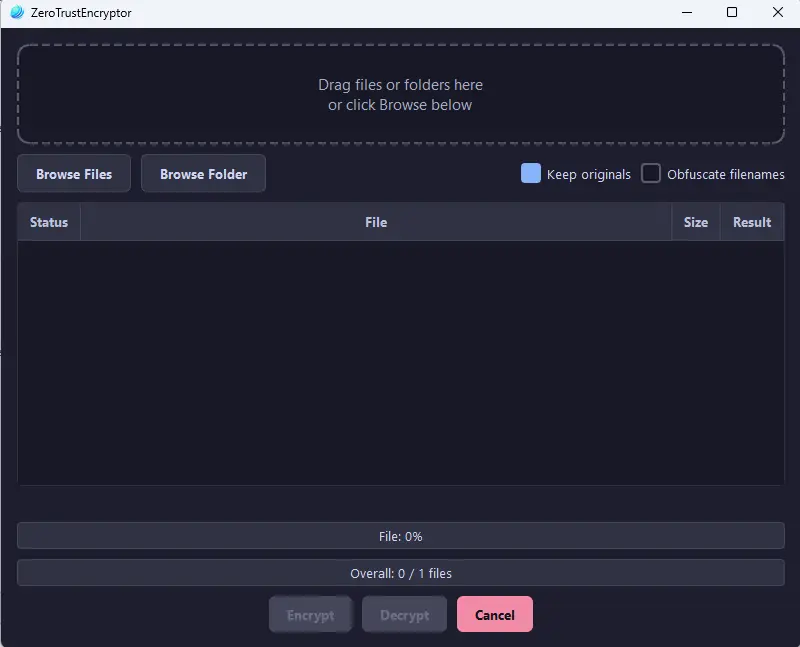
ZeroTrustEncryptor is a portable file encryption tool that protects your files with AES-256-GCM encryption and Argon2id key derivation. Drag and drop files into the GUI, enter a password, and your files are encrypted into .zte format. Decrypt them the same way. It also obfuscates filenames, securely wipes originals, and runs entirely offline as a single .exe - no installation, no accounts, no data leaves your machine.
Highlights

Why Use ZeroTrustEncryptor

AES-256-GCM Encryption

Military-grade authenticated encryption. Each file gets a unique nonce. Tamper detection is built in - if a single byte is altered, decryption fails.

Argon2id Key Derivation

Your password is stretched using Argon2id - the winner of the Password Hashing Competition. Resistant to GPU, ASIC, and side-channel attacks.

Filename Obfuscation

Encrypted files are renamed to random UUIDs. An observer can't tell what was encrypted just by looking at the filenames.

Secure File Wipe

After encryption, the original file is overwritten with random data before deletion. Simple deletion leaves recoverable data - this doesn't.

Drag-and-Drop GUI

No command line needed. Drop files onto the window, enter your password, and click Encrypt or Decrypt. Built-in progress bar and status updates.

Password Strength Check

Real-time password strength meter using the zxcvbn library. Warns you before encrypting with a weak password so you don't lock files behind a guessable key.

Getting Started

How It Works

Download, drop, encrypt, done.

1

Download the Executable

Download ZeroTrustEncryptor.exe. It's a single portable file - no installation, no dependencies. Run it from anywhere.

2

Drop Your Files

Drag and drop one or more files onto the application window, or use the file browser to select them.

3

Enter Your Password

Choose a strong password. The strength meter gives you instant feedback. Confirm it, then click Encrypt or Decrypt.

4

Done

Encrypted files are saved as .zte files with obfuscated names. Originals are securely wiped. To decrypt, drop the .zte file back in and enter the same password.

Technical Details

What's Under the Hood

Built on proven cryptographic primitives.

AES-256-GCM - Authenticated encryption with 256-bit keys and unique 12-byte nonces per file
Argon2id KDF - Memory-hard key derivation (64 MB, 3 iterations, 4 parallelism) with random 16-byte salt
Secure Wipe - Original files overwritten with cryptographically random data before deletion
.zte File Format - Salt + nonce + encrypted original filename + ciphertext + GCM auth tag
Portable Executable - Single .exe packaged with PyInstaller, no Python or dependencies required
FAQ

Frequently Asked Questions

Common questions about ZeroTrustEncryptor.

Is it free?

Yes, completely free. No sign-up, no licence key, no premium tier. Download and use it.

Is it safe to use?

ZeroTrustEncryptor uses AES-256-GCM (the same standard used by governments and financial institutions) with Argon2id key derivation. It runs entirely offline - no data is sent anywhere. The encryption is only as strong as your password, so use a strong one.

What is the .zte file format?

A .zte file contains the salt, nonce, encrypted original filename, ciphertext, and GCM authentication tag - everything needed to decrypt the file with the correct password. The format is specific to ZeroTrustEncryptor.

Do I need Python installed?

No. The download is a standalone .exe that includes everything it needs. Just run it directly - no Python, no pip, no setup.

Windows SmartScreen shows a warning?

SmartScreen may warn about the file because it's new and unsigned. This is normal for independent software. You can click "More info" then "Run anyway" to proceed. The tool is open-source if you want to inspect the code.

Can I use the command line instead?

Yes. ZeroTrustEncryptor supports full CLI mode. Run it with --help to see available commands. You can encrypt, decrypt, and configure options entirely from the terminal.

Download

Encrypt Your Files

No accounts. No cloud. No trust required.

Download ZeroTrustEncryptor